Swarm
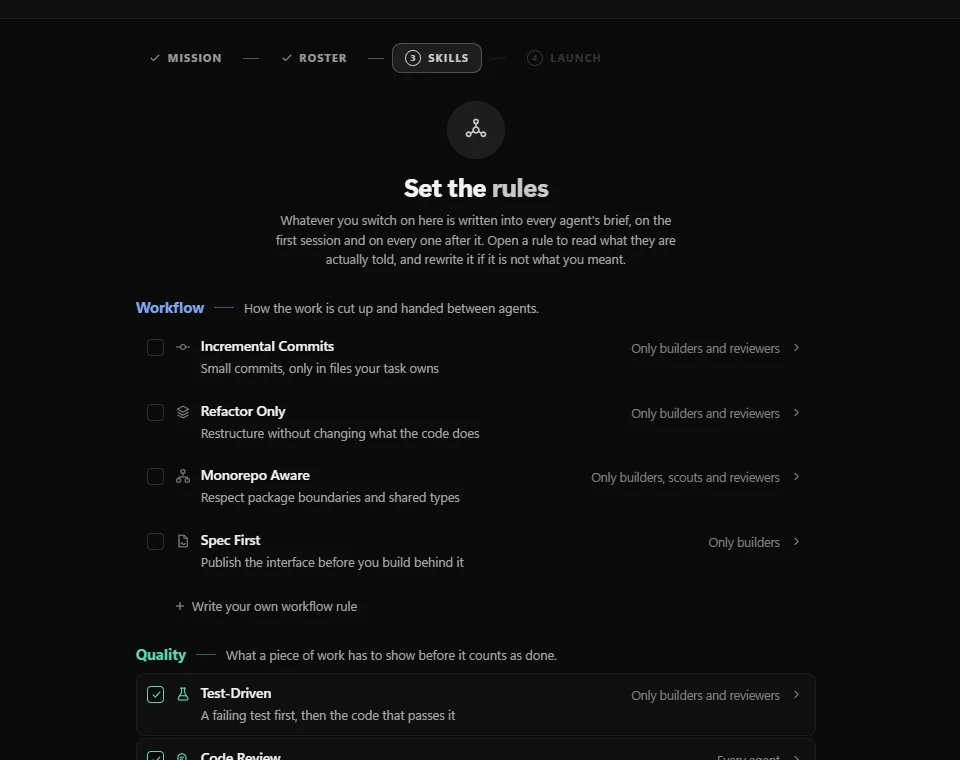
A team of agents on one goal, from a builder and a reviewer up to twelve, working to rules you switch on once.
Your developers already work with Claude Code, Codex and Gemini. SpaleStudio puts all of them side by side in one Windows workspace, so the whole team sees what each agent is doing, what it changed and what it is waiting for.
Windows 10 and 11 · Agents keep the accounts you already pay for

Every tile is a real terminal in your project folder, so whatever else your team runs in a terminal runs there too.
 Claude Code
 Codex
 Gemini CLI
 Cursor
 Copilot
 OpenCode
 Kimi
 Grok
The story
Not long ago an AI agent was a chat box. Today it reads the repository, writes the migration, runs the tests and asks before it deletes anything. Most developers keep three or four going at once, in a pile of terminal windows.
Nobody can see which one is stuck on a question or what was decided yesterday, and when a window closes, its context goes with it. So we kept the agents exactly as they are and built the room around them.
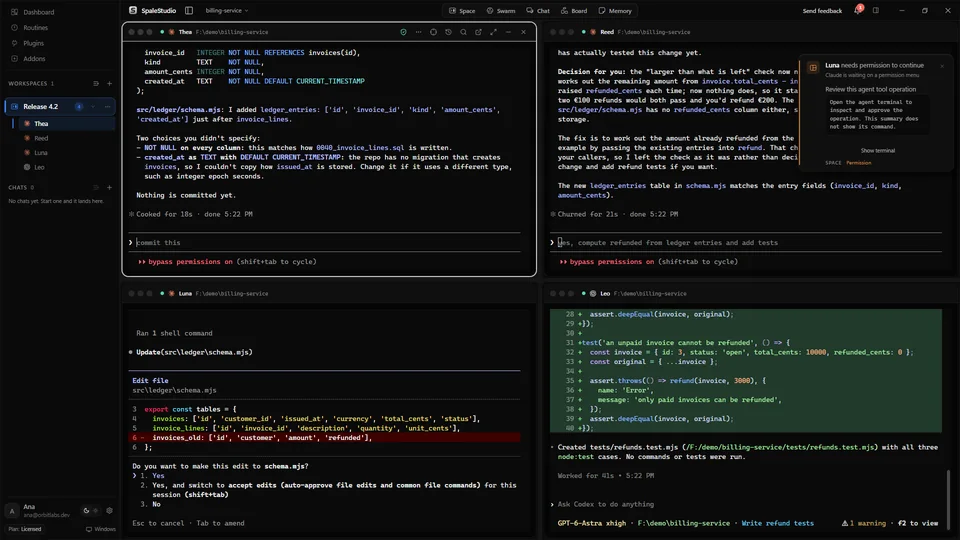
Every agent in view The one that needs you, flagged Every change in one place
A day in SpaleStudio
A release day on a demo billing service. The pictures are real screenshots of SpaleStudio 1.8 with real agents doing the work; only the project is made up.
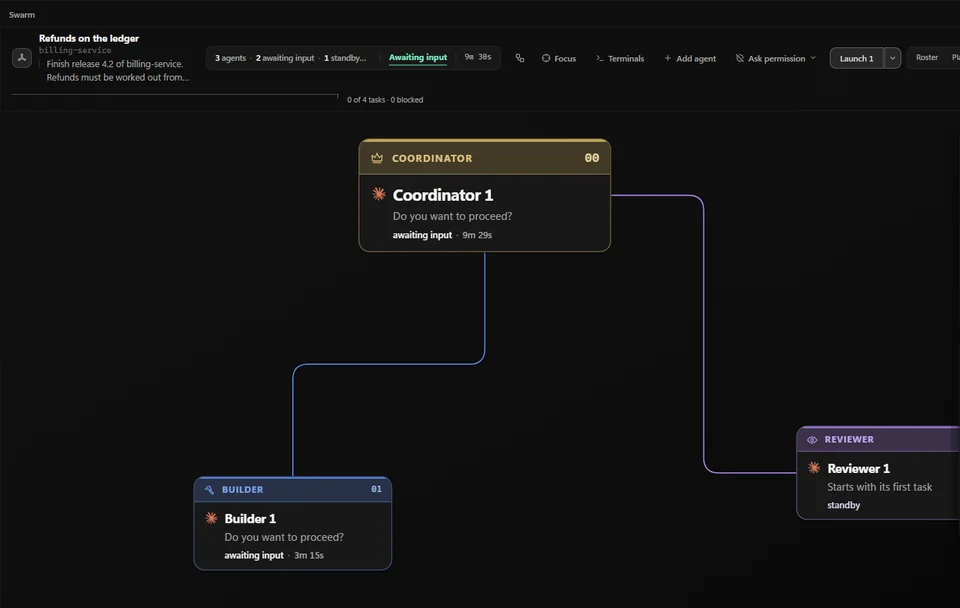
The lead starts a Swarm with one goal: work refunds out from the ledger for release 4.2. A coordinator, a builder and a reviewer take their places, and every one of them works to the same rules: a failing test first, and a review of its own diff.
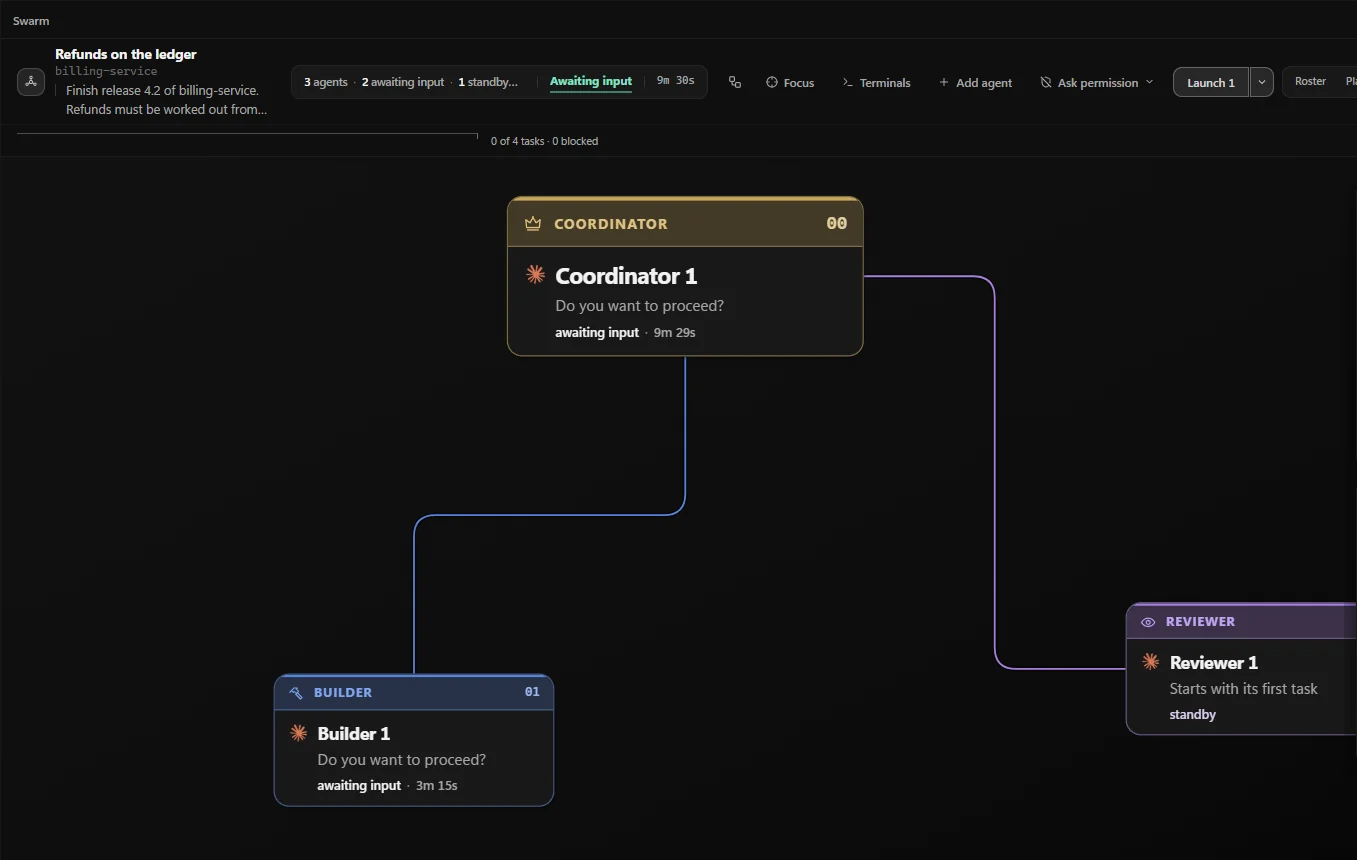
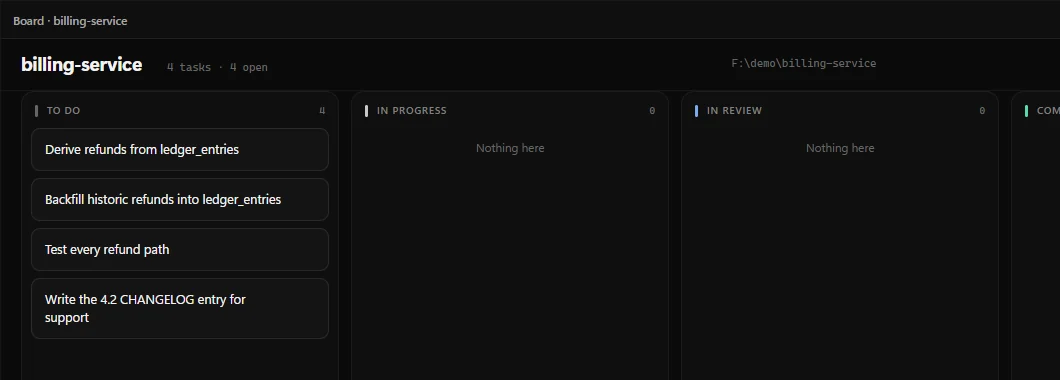
The coordinator reads the code and writes the plan as tasks on the project's board: derive refunds from ledger_entries, backfill the historic ones, test every refund path, and write the changelog entry for the support team.
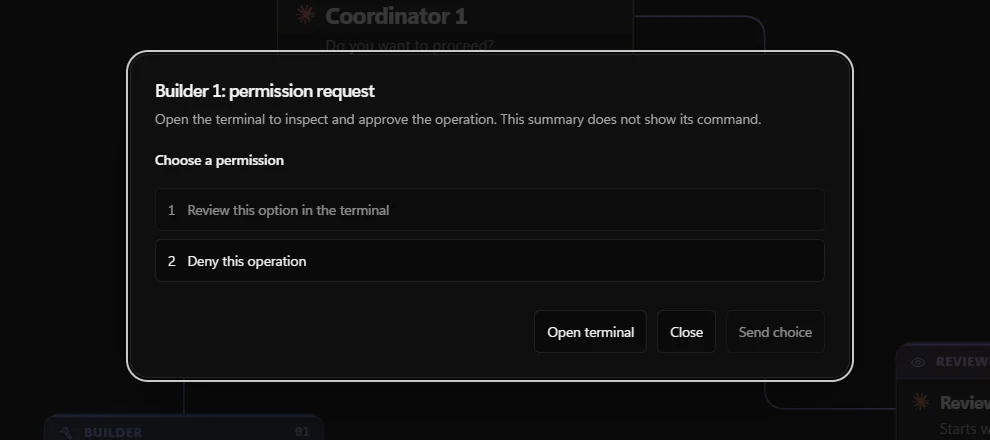
The Swarm runs safe, so the builder asks before it runs a command, and SpaleStudio puts the question in front of you. Messages from other agents wait until you have answered, so nothing picks an answer for you.
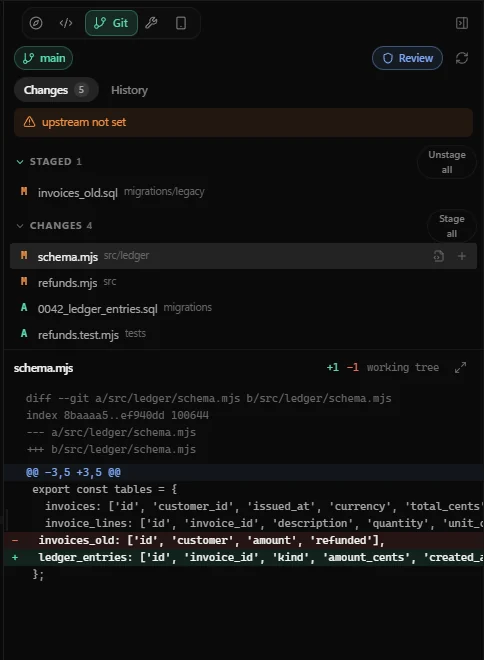
Four agents worked in the same folder. The Git panel lists every file they touched, shows the diff, and lets someone review it before anything is committed.
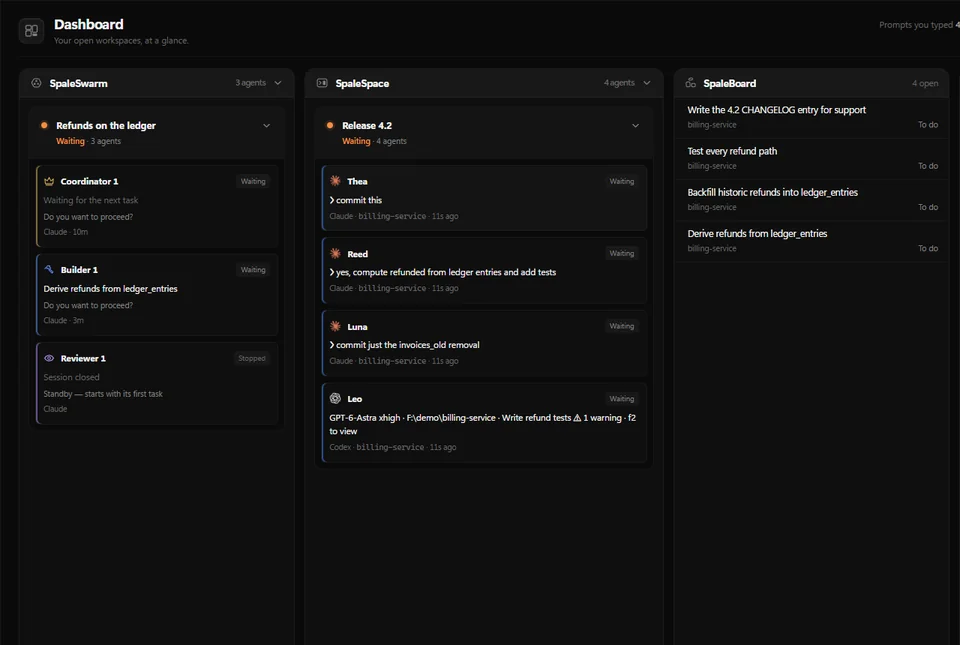
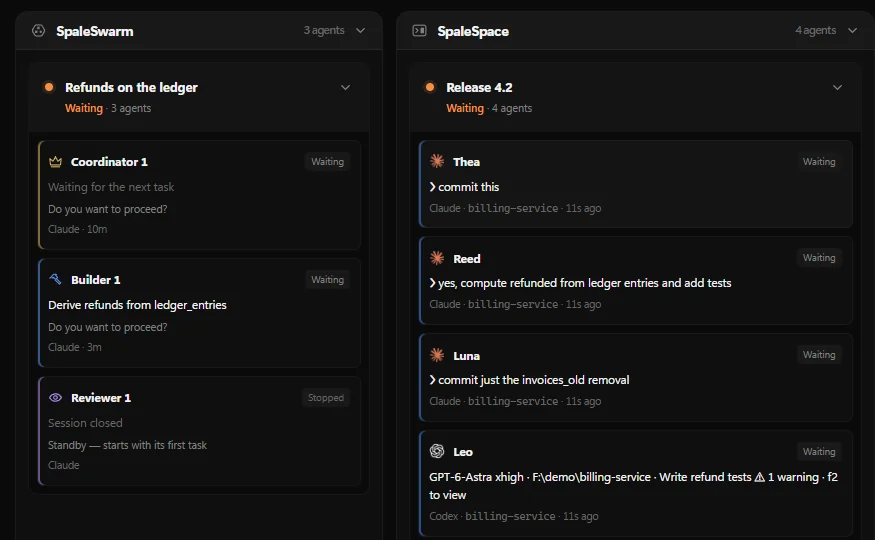
The Dashboard shows every open workspace, each agent in it and what it is doing or waiting for: the Swarm's three agents, and Thea, Reed, Luna and Leo in Release 4.2.
Features
The rest of SpaleStudio 1.8, beside the terminals your agents already run in.
A team of agents on one goal, from a builder and a reviewer up to twelve, working to rules you switch on once.
Every workspace you have open, every agent in it, and what each one is doing or asking right now.
Talk to Claude, Codex or another installed CLI with files, pictures and sources, and switch CLI without losing the thread.
Work that starts on its own, at times you set like an alarm.
See where each agent is working, and follow the one writing, letter by letter.
MCP servers, skills and hooks for your CLIs in one step, with keys kept out of source files.
A browser inside SpaleStudio. Links from a terminal open in it, beside the code.
A shared vault of linked notes your agents search and write to, with a record of who changed what.
The programs
SpaleHub is the one download. Sign in once on a computer and it installs, licenses and updates the rest.
Where the agents work
Agents side by side in real terminals, with Swarm, Chat, Board, Memory, Routines, a browser and Git around them.
Where the licences live
Signs each computer in, installs the other programs and keeps them updated with signed releases, add-ons and release notes.
Talk instead of type
Press a key or a mouse button, speak, and the words are typed into whatever field has focus. Use your OpenAI key, or a Whisper model on the computer so your voice never leaves it.
For companies
What a company should know before it puts Spale on its developers' machines, and the page it manages them from.
SpaleStudio opens project folders on each developer's computer and runs real terminals in them. Spale doesn't upload your projects.
Each agent signs in with the provider your company already pays. Spale doesn’t resell model usage or take a cut.
Your account page shows which computers use each licence. When someone leaves, remove theirs.
Adding a computer takes a six-digit code sent to the account's email, so a leaked password can't take a seat.
SpaleHub installs a release only when its signature checks out, for every Spale program.
Each workspace starts safe or with Skip Permissions; you choose. While an agent asks, nothing answers for you.
The Spale plan
One plan. No tiers.
Every Spale program on one account. The price isn't set yet: until it is, licences are issued by hand, and you'll hear the price before anything is charged.
Questions
Spale doesn’t upload your projects. The agents talk to their own providers, just as they do outside SpaleStudio, under the terms your company has with those providers.
Nothing to Spale. Each agent bills through its own provider account. Spale doesn’t resell usage and takes no cut of it.
SpaleStudio launches the command-line agents installed on the computer: Claude Code, Codex, Gemini, Cursor, Copilot, OpenCode, Kimi and Grok.
Only if you let them. Each Space or Swarm starts either safe, where agents ask before they act, or with Skip Permissions. You choose every time you start one.
A computer. SpaleHub licenses the Spale programs on the computer it runs on and renews the licence while it is open. SpaleStudio pauses if SpaleHub closes and carries on when it is back.
Windows 10 and 11, 64-bit. If a Mac or Linux version is made, the download page will say so first.
Download
Install SpaleHub, sign in, and open your first project with every agent in view.
Windows 10 or 11, 64-bit. SpaleHub is the one installer: it signs the computer in, then installs and updates SpaleStudio and SpaleVoice.
Download SpaleHubEvery release is signed. Release notes
Each agent signs in with the provider your company already pays, the way it does outside SpaleStudio. Spale takes no cut of that usage.
Claude CodeCodexGemini CLICursorCopilotOpenCodeSpale is a Windows program today. If a Mac or Linux version is made, this page will say so first.
Create an accountThis doesn't look like a Windows computer. To install Spale, open this page on the Windows PC you'll use it on.